
Overview
When a payment is sent through the Circle Payment Network (CPN), the final leg of the transaction is executed over SWIFT. Every SWIFT payment carries a unique reference number called the UETR (Unique End-to-End Transaction Reference) — think of it as a tracking number for international bank transfers. It lets you follow the payment across every bank it passes through, all the way to the beneficiary's account.
This article covers what a UETR is, where to track it, and how to read the status codes you'll see. 👇
🧾 What is a UETR?
The UETR is a unique code (36 characters, similar to a UUID) assigned to a SWIFT payment as soon as it enters the SWIFT gpi (Global Payments Innovation) network. It stays attached to the payment from start to finish, no matter how many banks it passes through along the way.
Since CPN payments settle out to the beneficiary via SWIFT, every CPN payment has a UETR you can use to check its status in real time.
📥 Where to Find the UETR
Before tracking a payment, you'll need its UETR. For CPN payments, this is found on the payout receipt, which can be downloaded from the VelaFi platform:
- Go to the VelaFi platform and log in.
- Navigate to Order History.
- Select On/Off Ramp or Global Payment.
- Go to the Completed tab.
- Click Detail on any completed transaction made through Circle Payment Network (WIRE - CPN).
- Click the download button in the upper-right corner to download the payout receipt.
- Open the receipt — the tracking number shown is the UETR for that payment. 🎯
Here's an example of a completed CPN payment in Order History :
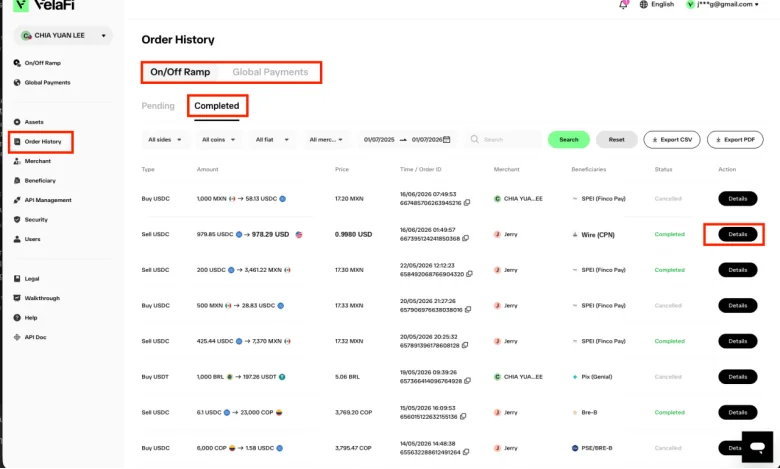
💡 Tip: This tracking number only applies to CPN payments — it's the UETR used for SWIFT gpi tracking.
🌐 Where to Track the Payment
CPN payments settled via SWIFT can be tracked using Standard Chartered's Straight2Bank (S2B) portal:
Steps to track a payment:
- Open the Straight2Bank tracker link above.
- Enter the payment's UETR.
- Review the status returned — code, description, timestamp, and (where available) the sending/forwarding bank (BIC) and settled amount.
💡 Tip: Don't have the UETR yet? See Where to Find the UETR above for how to pull it from the payout receipt.
📊 Understanding the Status Codes
SWIFT gpi tracking uses a small set of standardized codes. Here are the two you'll run into most often with CPN payments.
✅ ACCC — Payment Completed
Meaning: The payment is fully settled — funds have been credited to the beneficiary's account.
This is the status you're hoping for. Nothing further is pending once you see this.
🕓 ACSP — Accepted, Settlement in Progress
Meaning: The payment has been accepted by the receiving bank but hasn't settled yet. This is often a sign the payment is under manual review at the receiving or an intermediary bank.
ACSP is usually paired with a reason code, which gives more detail on what's happening:
| Reason Code | Meaning |
| ACSP/G000 | Payment was passed to a bank that is a member of the SWIFT gpi network. ✅ Tracking stays fully visible. |
| ACSP/G001 | Payment was passed to a bank that is not a member of SWIFT gpi. ⚠️ See explanation below. |
| ACSP/G002 | Credit may not land same-day. Often means the payment is under manual review at the receiving bank. |
| ACSP/G003 | Bank is waiting for documents. Rarely, this can also mean there's a mistake in the beneficiary's account details. |
| ACSP/G004 | Bank is waiting for a cover payment. |
⚠️ What does ACSP/G001 (non-gpi agent) actually mean?
Not every bank in the world belongs to the SWIFT gpi network — it currently covers thousands of institutions, but not all of them. ACSP/G001 means the payment has been forwarded to one of these non-gpi banks to complete the final leg.
In practice, this means:
- The payment hasn't failed — it's simply left the part of the network that provides real-time, detailed tracking.
- Tracking visibility drops from this point forward, since the receiving bank isn't required to report status updates back through gpi.
- The payment can still complete normally — it just may take longer to confirm, and further updates may need to come directly from the receiving bank rather than the tracker.
📋 Quick Reference Table
| Status | Meaning | What to Do |
| ACCC | ✅ Payment completed — beneficiary credited | Nothing — you're done |
| ACSP (no reason code) | 🕓 Accepted, settlement in progress | Monitor — may resolve on its own |
| ACSP/G000 | Sent to a SWIFT gpi member bank | Monitor |
| ACSP/G001 | Sent to a non-gpi bank — tracking visibility drops | Monitor; expect fewer updates going forward |
| ACSP/G002 | Possible manual review at receiving bank | Monitor; escalate if prolonged |
| ACSP/G003 | Waiting for documents, or possible beneficiary detail error | Verify beneficiary details with client if delayed |
| ACSP/G004 | Waiting for a cover payment | Monitor |
❓ FAQs
Q: What if I don't have a UETR for a payment? A: Download the payout receipt from Order History → Completed → Detail on the VelaFi platform — the UETR appears there as the tracking number.
Q: The status has been stuck on ACSP for several days — what should I do? A: Check for a reason code (e.g., G002 or G003). If it points to manual review or a documentation issue, it may just need more time at the receiving bank. If it's dragging on, escalate for further investigation.
Q: Does ACSP mean something is wrong with the payment? A: Not necessarily. It just means the payment's been accepted but hasn't fully settled — a normal in-between state, though it can sometimes signal manual review.
Q: My payment shows ACSP/G001 — should I be worried? A: Not automatically. It means the payment moved to a bank outside the SWIFT gpi network, so tracking becomes less detailed from that point on. The payment can still complete normally — it's just less visible to us in the tracker.
Q: Is the UETR the same as the CPN order ID? A: No. The UETR is a SWIFT-specific reference for the SWIFT leg of the payment — separate from any internal CPN or VelaFi order ID.
✨ Summary
- CPN payments settle out via SWIFT, and every SWIFT payment has a unique UETR.
- Find the UETR on the payout receipt, downloadable from Order History → Completed → Detail on the VelaFi platform.
- Track it in real time via the Straight2Bank tracker.
- ACCC ✅ = payment completed.
- ACSP 🕓 = still settling, often under manual review — check the reason code (G000–G004) for more context.
- G001 just means the payment left the gpi network's visibility — not that something's wrong.